> For the complete documentation index, see [llms.txt](https://document.tek-labs.app/post-purchase-userguide/llms.txt). Markdown versions of documentation pages are available by appending `.md` to page URLs; this page is available as [Markdown](https://document.tek-labs.app/post-purchase-userguide/introduction/readme.md).
# What we do
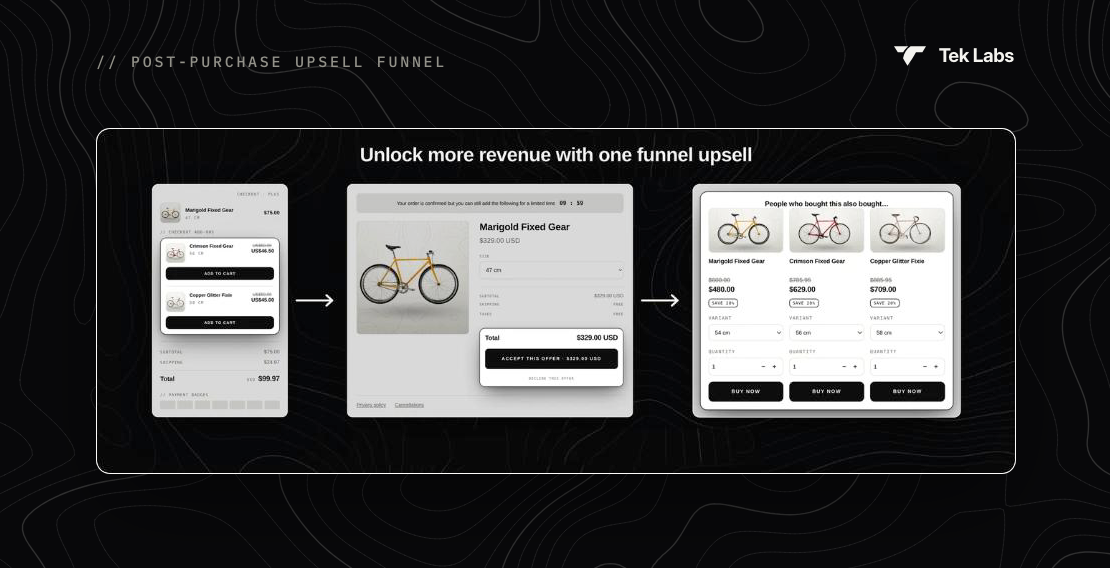
Post-purchase upsells, Thank you page offers and checkout widgets for Shopify, managed from one funnel.
**Tek Labs PostPurchase** helps you raise average order value after the customer has already decided to buy. You build a **funnel** once. The app then shows the right offer at each step of the buying journey: on the checkout page, on the post-purchase page right after payment, and on the Thank you page.
## What you can build
| Page | What the shopper sees |
| ---------------------------------------------------------------------------------------------------------------------- | ------------------------------------------------------------------------------------------------------------------------------------------------------------------- |
| [Post-purchase upsell](/post-purchase-userguide/user-guides/how-to-set-up-funnel-step-by-step/post-purchase-upsell.md) | A one-click offer after payment. Accepting adds the product to the same order, with no need to re-enter card details. Supports Upsell #1, Upsell #2 and a Downsell. |
| [Thank you page](/post-purchase-userguide/user-guides/how-to-set-up-funnel-step-by-step/thank-you-page.md) | Product recommendations, coupon codes, banners, images, buttons and post-purchase surveys. |
| [Checkout page](/post-purchase-userguide/user-guides/how-to-set-up-funnel-step-by-step/checkout-page.md) | Trust badges, testimonials, rewards progress bar, order notes and in-checkout upsells. **Shopify Plus only.** |
Every funnel has its own [targeting conditions](/post-purchase-userguide/user-guides/how-to-set-up-funnel-step-by-step/funnel-conditions.md), every text can be [translated](/post-purchase-userguide/user-guides/translation.md), and results are tracked in [Analytics](/post-purchase-userguide/user-guides/analytics.md).
## Get started in three steps
{% stepper %}
{% step %}
### Activate the app in Shopify checkout
Select **Tek Labs PostPurchase** as the app for your post-purchase page. See [Install and activate the app](/post-purchase-userguide/getting-started/install-app.md).
{% endstep %}
{% step %}
### Create a funnel
Open **Funnels & Thank You Page › Create funnel**, set who should see it and add your offers. See [How to set up a funnel](/post-purchase-userguide/user-guides/how-to-set-up-funnel-step-by-step.md).
{% endstep %}
{% step %}
### Place your blocks and test
Add the Thank you and Checkout blocks you designed in the Shopify checkout editor, then place a test order.
{% endstep %}
{% endstepper %}
{% hint style="info" %}
Need a hand? Chat with us from inside the app or email ****.
{% endhint %}