> For the complete documentation index, see [llms.txt](https://document.tek-labs.app/salepify-userguide/llms.txt). Markdown versions of documentation pages are available by appending `.md` to page URLs; this page is available as [Markdown](https://document.tek-labs.app/salepify-userguide/user-guides/upsell-offers/you-may-also-like.md).
# You May Also Like
The YMAL feature allows you to show product recommendations to customers and encourage additional purchases directly from the widget.
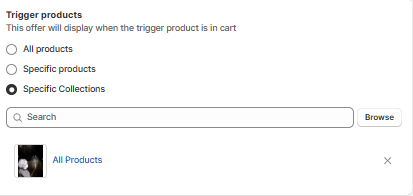
### 1. Trigger Products
Choose when the recommendation widget should appear.
**All products**\
The upsell widget appears when any product is added to the cart.
**Specific products**\
The upsell widget appears only when selected products are in the cart.
**Specific collections**\
The upsell widget appears when products from selected collections are in the cart.
### 2. Upsell Product Settings
#### Product Selection
Choose how upsell products are selected.
**Shopify recommendations**\
Products are automatically generated by Shopify based on customer behavior and product relationships.
Available recommendation intents\
Related products\
Complementary products
{% hint style="info" %}
Related product recommendations are auto-generated by Shopify.\
Complementary product recommendations must be configured manually in the Shopify Search and Discovery app.
{% endhint %}
**Specific product**\
Manually select a fixed product to display as the upsell item.
#### Recommendation Intent
This option is available when using Shopify recommendations.
It determines how Shopify selects recommended products.
{% hint style="info" %}
Related products are similar items that customers may also like.\
Complementary products are items that pair well with the product already in the cart.
{% endhint %}
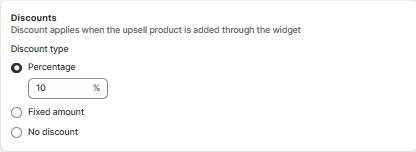
### 3. Discounts
Apply a discount when customers add the upsell product through the widget.
**Percentage discount**\
Apply a percentage-based discount to the upsell product.
**Fixed amount discount**\
Apply a fixed amount discount to the upsell product.
**No discount**\
The upsell product is added at full price.
{% hint style="warning" %}
Discounts only apply when the product is added using the upsell widget.
{% endhint %}
### 4. Active Dates
Set when the You May Also Like offer is active.
Choose a start date and time to begin displaying the widget.\
Optionally set an end date and time.
{% hint style="warning" %}
If no end date is set, the offer will continue running.
{% endhint %}
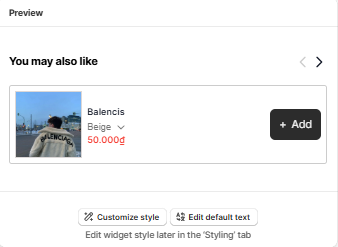
### 5. Preview
The Preview panel shows how the You May Also Like widget will appear on your storefront.
You can use this to\
Review product layout\
Check pricing and discount display\
Confirm call-to-action behavior
You can also customize the appearance and text by clicking\
Customize style\
Edit default text