> For the complete documentation index, see [llms.txt](https://document.tek-labs.app/post-purchase-userguide/llms.txt). Markdown versions of documentation pages are available by appending `.md` to page URLs; this page is available as [Markdown](https://document.tek-labs.app/post-purchase-userguide/getting-started/dashboard.md).
# Dashboard
Your starting point in the app.
**Home** ("Welcome to Tek Labs") is the first page you see when you open the app.
## Get started with Tek Labs PostPurchase
A setup checklist with a progress bar ("You've done 2 of 5 steps"). Click a step to expand it.
1. **Activate Tek Labs PostPurchase in checkout**: **Active** (or **Deactive**) opens Shopify's checkout settings at the Post-purchase page section. **Check status** tells you whether the app is selected. See [Install and activate the app](https://document.tek-labs.app/post-purchase-userguide/getting-started/install-app.md).
2. **Create your first Funnel**: **Create funnel** opens a new funnel.
3. **Set up Thank you page**: **Create block** opens a new funnel on the Thank you page tab. **Set up Thank you page** opens the Shopify editor so you can place the block.
4. **Set up Checkout**: the same as step 3 for Checkout blocks. This step only appears on Shopify Plus stores.
5. **Confirm everything works properly**: test your funnel, then click **Yes, it works!**. If something is wrong, **No, I need help** opens a chat with our team.
You can collapse the checklist with the arrow. Once every step is done you can close it with **X**.
## Post-purchase page and overview
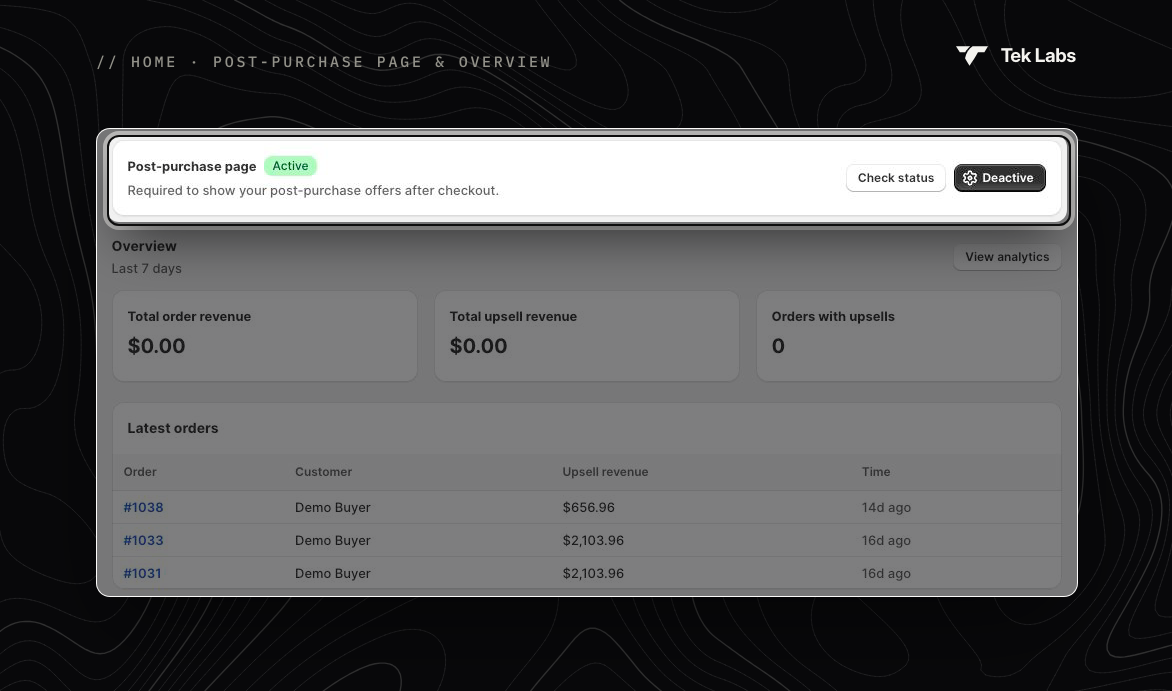
**Post-purchase page** shows whether the app is selected for your post-purchase page (**Active** or **Inactive**). Post-purchase offers only show while it's **Active**.
**Overview** shows the last 7 days:
| Metric | What it shows |
| ------------------------ | ----------------------------------------------------------- |
| **Total order revenue** | Total value of orders that included an upsell from the app. |
| **Total upsell revenue** | Revenue from the upsell products themselves. |
| **Orders with upsells** | Number of orders where the customer accepted an upsell. |
Click **View analytics** for the full report. See [Analytics](https://document.tek-labs.app/post-purchase-userguide/user-guides/analytics.md).
## Latest orders and featured templates
* **Latest orders**: your three most recent orders with an upsell, with the upsell revenue. Click an order number to open it in Shopify.
* **Featured templates**: **Create upsell funnel** opens a new funnel so you can start building straight away.