> For the complete documentation index, see [llms.txt](https://document.tek-labs.app/free-gift-userguide/llms.txt). Markdown versions of documentation pages are available by appending `.md` to page URLs; this page is available as [Markdown](https://document.tek-labs.app/free-gift-userguide/getting-started/managing-offers.md).
# Managing offers
Create offers, find your way around the offer editor, and schedule, activate, validate and manage every offer type.
Everything on this page works the same way for every offer type: Free gift, Progress bar, Gift discount code, Volume discount, Product bundle and You may also like.
## The Offers list
Open **Offers** in the app menu.
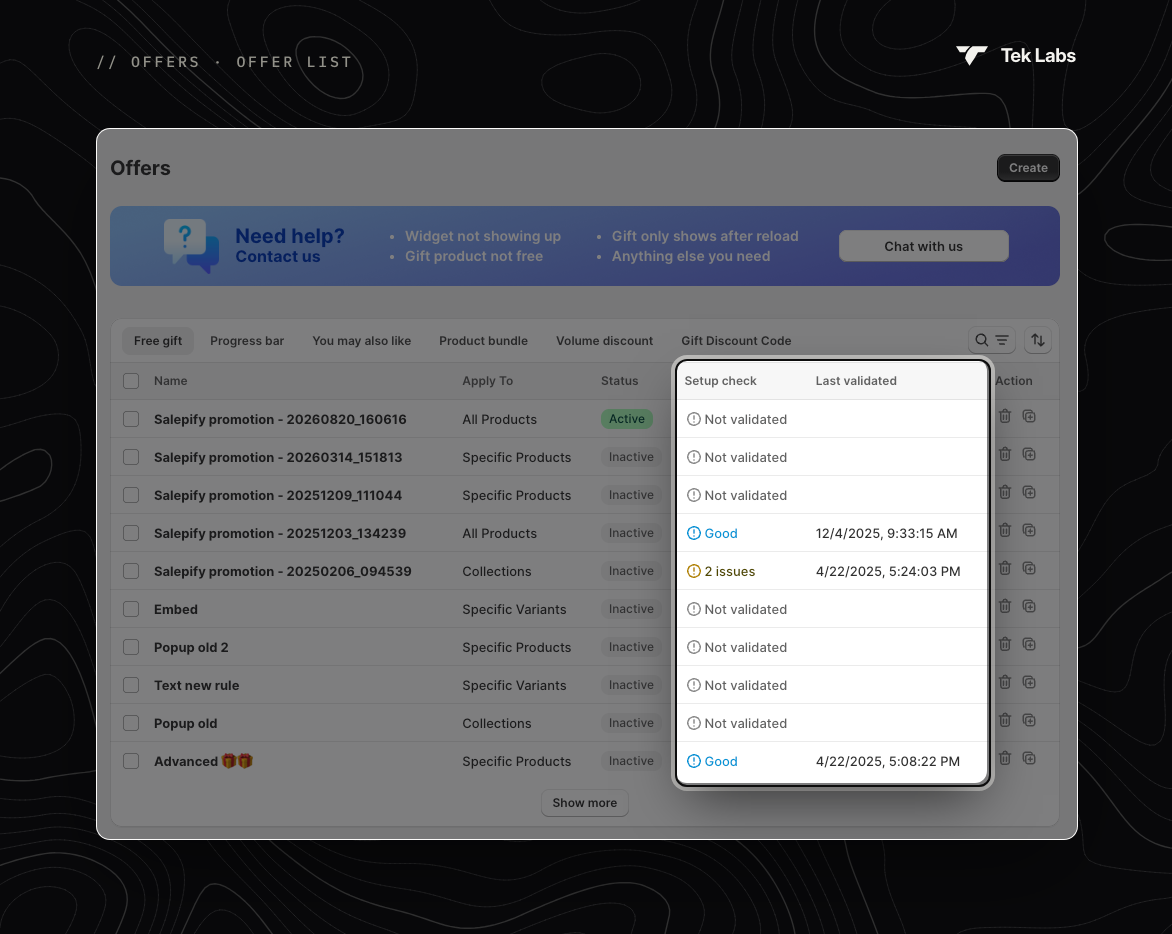
Offers list
* **Tabs**: **Free gift**, **Progress bar**, **You may also like**, **Product bundle**, **Volume discount** and **Gift Discount Code**. Each tab lists the offers of that type.
* **Search and filter**: search by name. Filter by **Status** (Free gift) or **Discount Status** (Volume discount). Sort by creation date.
* **Columns** (Free gift tab): **Name**, **Apply To**, **Status**, **Setup check**, **Last validated** and **Action** (delete or duplicate).
* **Show more** loads the next 10 offers.
### Status
| Status | Meaning |
| ------------- | ------------------------------------------------------- |
| **Active** | Running on your storefront now. |
| **Scheduled** | Will start at the scheduled date and time. |
| **Inactive** | Not running. It has no schedule, or it was deactivated. |
| **Expired** | Its end date has passed. |
### Setup check
The **Setup check** column shows the latest [Validate offer](#validate-offer) result:
* **Not validated**: the offer has never been checked.
* **Good**: no issues found.
* **{n} issues**: hover to see the list, for example *Widget block missing in theme*, *Out-of-stock/draft gift in offer* or *Draft product included*.
### Bulk actions
Select one or more offers to **Activate**, **Deactivate**, **Schedule**, **Edit schedule** (one offer) or **Delete** them together.
{% hint style="info" %}
The **Need help?** banner at the top of the list lists the most common questions. Click **Chat with us** to reach support.
{% endhint %}
## Create an offer
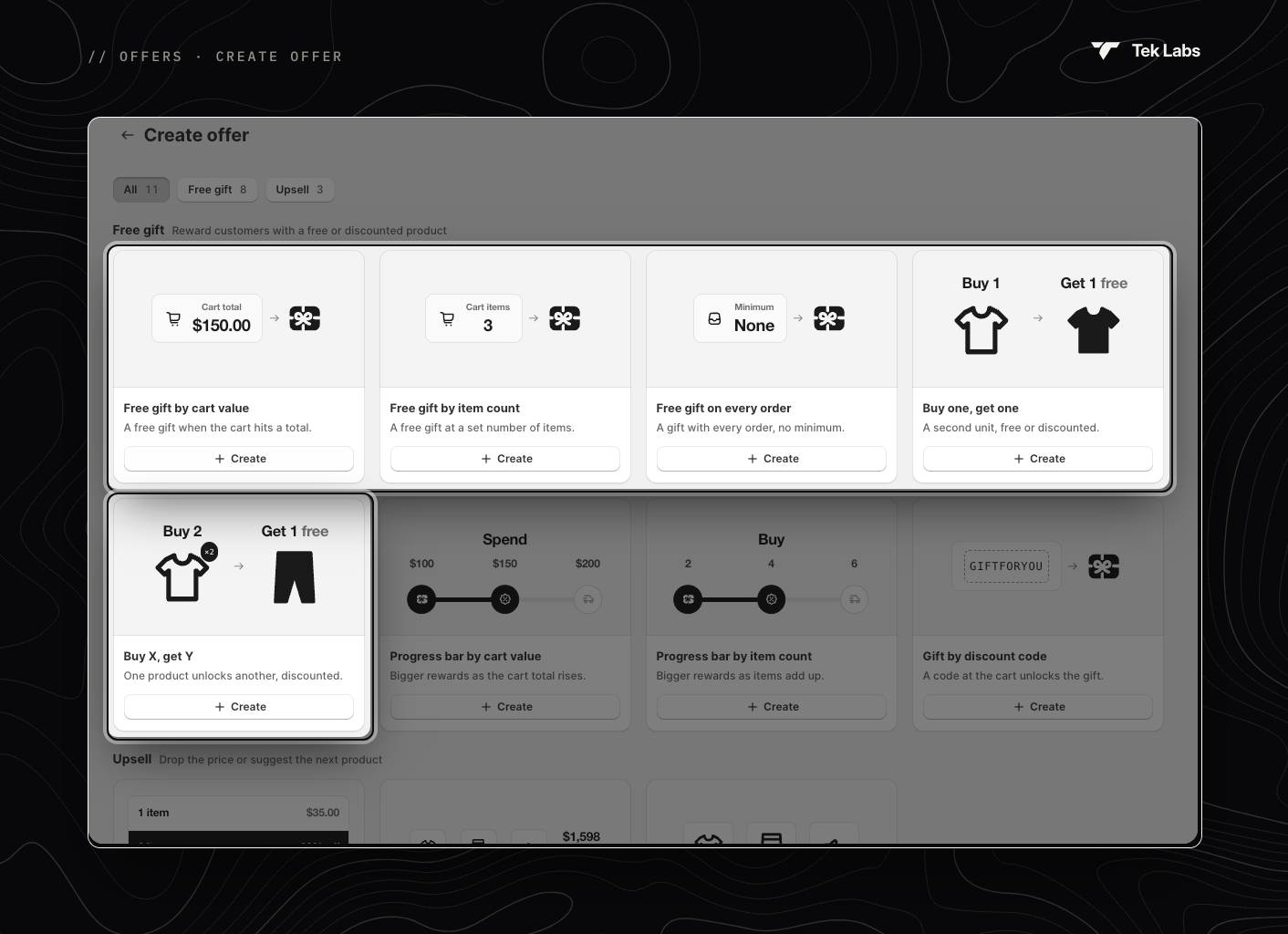
Click **Create** on the Offers list, or **Create offer** on the Dashboard, and pick a template.
Free gift templates
| Section | Template | Guide |
| ------------- | -------------------------------------------------------------------------------------------------------------- | ---------------------------------------------------------------------------------------- |
| **Free gift** | Free gift by cart value · Free gift by item count · Free gift on every order · Buy one, get one · Buy X, get Y | [Free Gift](/free-gift-userguide/user-guides/gift-offers/free-gift.md) |
| **Free gift** | Progress bar by cart value · Progress bar by item count | [Progress Bar](/free-gift-userguide/user-guides/gift-offers/progress-bar-type.md) |
| **Free gift** | Gift by discount code | [Gift Discount Code](/free-gift-userguide/user-guides/gift-offers/gift-discount-code.md) |
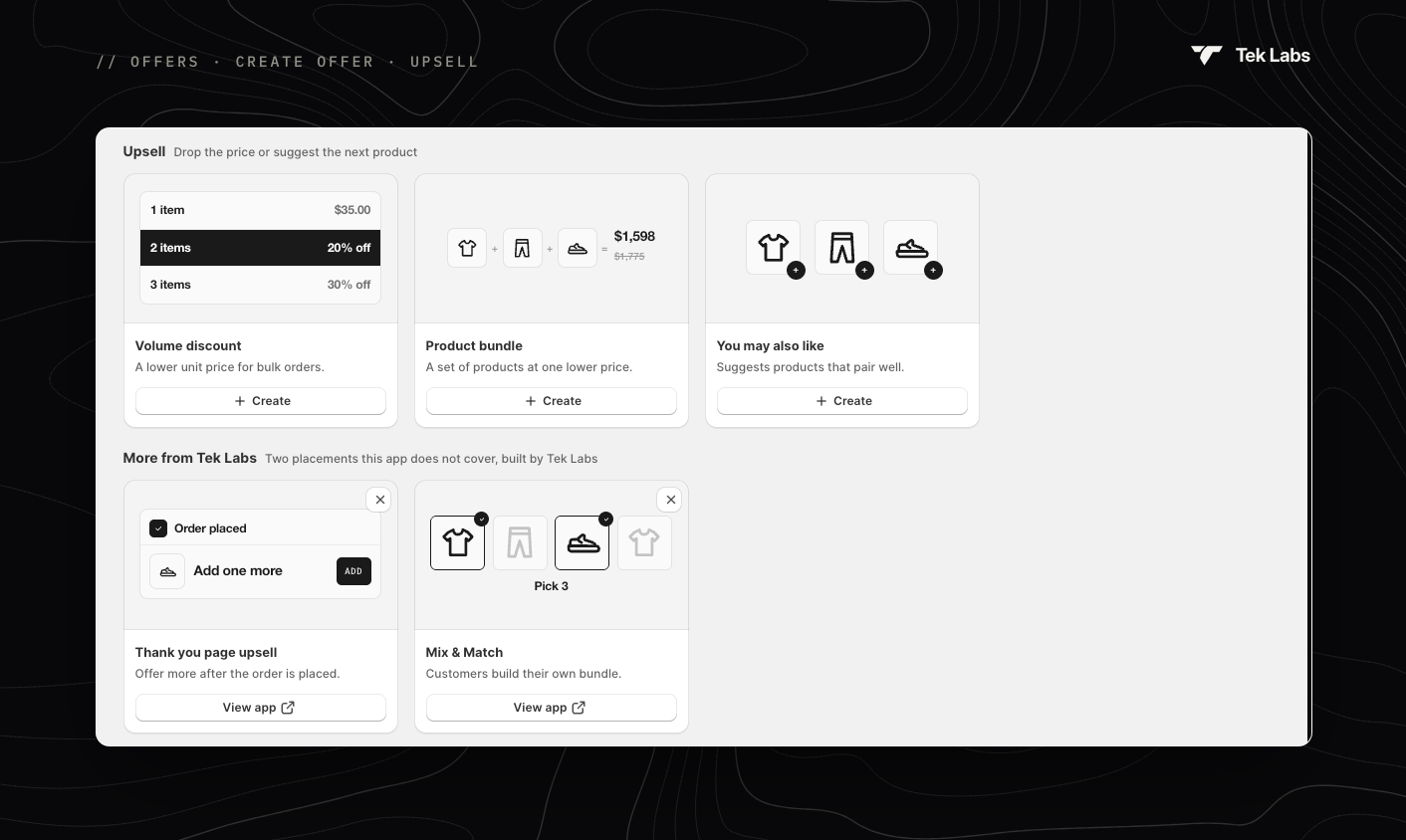
| **Upsell** | Volume discount · Product bundle · You may also like | [Upsell offers](/free-gift-userguide/user-guides/upsell-offers.md) |
Use the **All**, **Free gift** and **Upsell** buttons at the top to filter the cards.
Upsell templates and other Tek Labs apps
The **More from Tek Labs** section links to two other apps for placements this app doesn't cover: **Thank you page upsell** and **Mix & Match** bundles.
## The offer editor
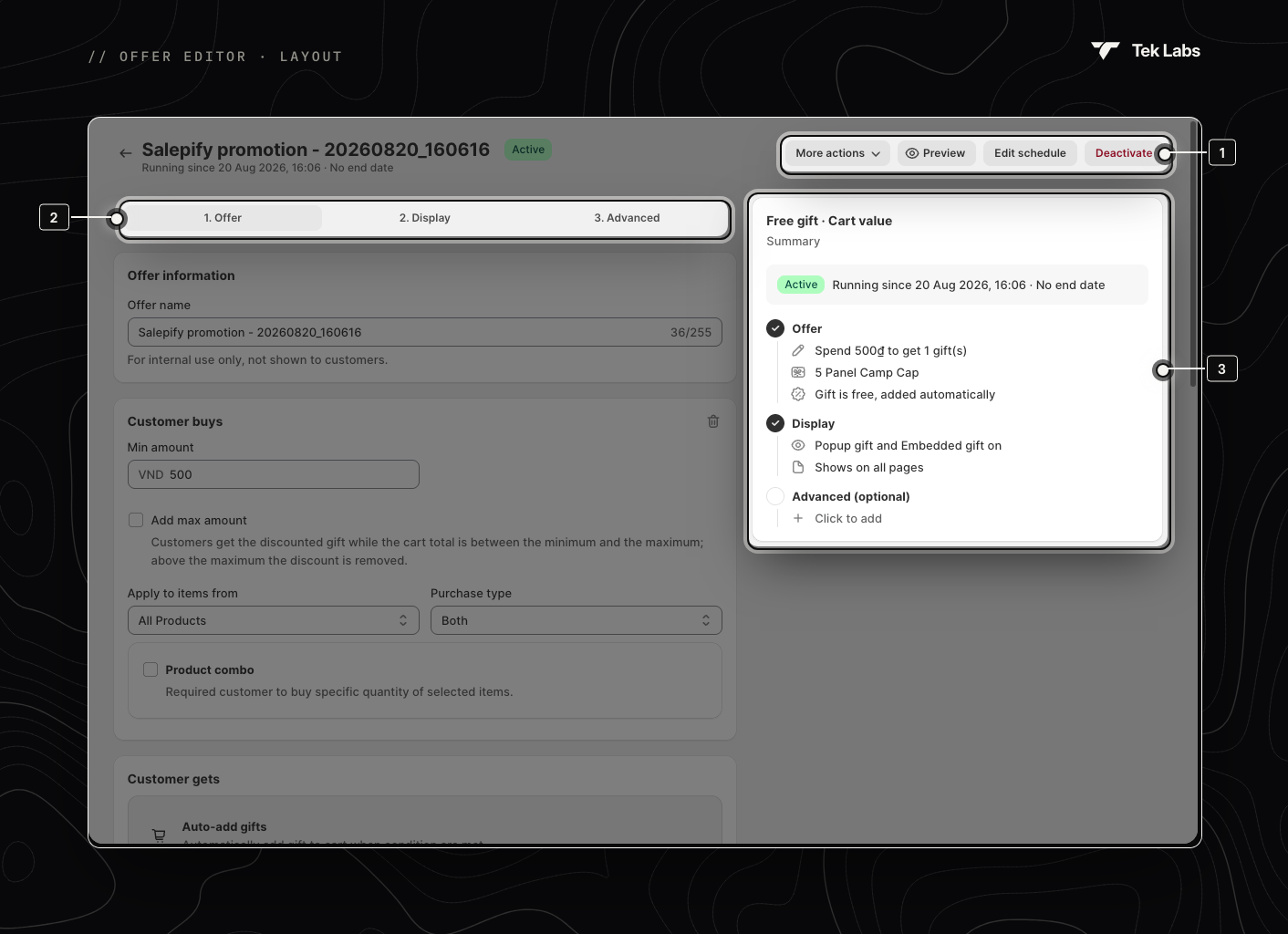
1. Header actions · 2. Steps · 3. Summary
1. **Header**: the offer name, a status badge with its schedule line, and the [header actions](#header-actions).
2. **Steps**: settings are split into **1. Offer**, **2. Display** and **3. Advanced** (You may also like has two steps). Use the buttons at the bottom of each step to move on. The last step has **Save**. Shopify's **Save / Discard** bar also appears whenever you have unsaved changes.
3. **Summary**: a live overview of your offer, step by step. Click any line to jump to that setting.
### Things left before the offer can go live
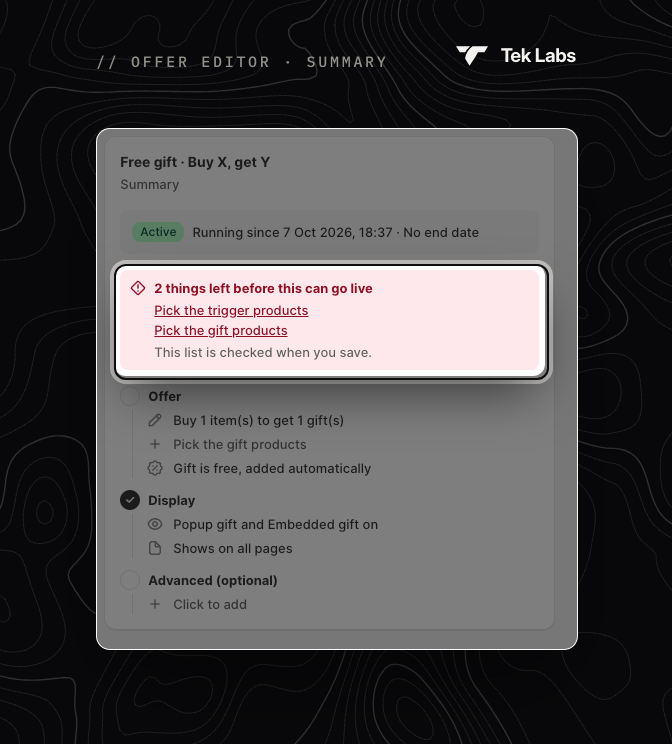
If something required is missing, the Summary shows a red box such as **2 things left before this can go live** with a link for each item. **Activate** and **Schedule** stay disabled until the list is empty. The list is checked each time you save.
## Header actions
| Button | When you see it | What it does |
| -------------------------------- | ------------------------------------------------------- | ------------------------------------------------------------------------------------------------------------------------------------------------------------------------------------------------------------------------------------------------------------------------------------ |
| **Activate** | Inactive or Expired offers | Starts the offer on your storefront straight away. For an expired offer, the end date is cleared. |
| **Deactivate** | Active or Scheduled offers | Stops the offer straight away and **clears its start and end dates**. To run it again, schedule or activate it again. |
| **Schedule** / **Edit schedule** | Always (after the first save) | Opens the schedule window. See below. |
| **Validate offer** | Inactive or Scheduled Free gift and Progress bar offers | Runs the setup check. See [Validate offer](#validate-offer). |
| **Preview** | After the first save | Opens your storefront in a new tab (for bundles, the bundle product page). |
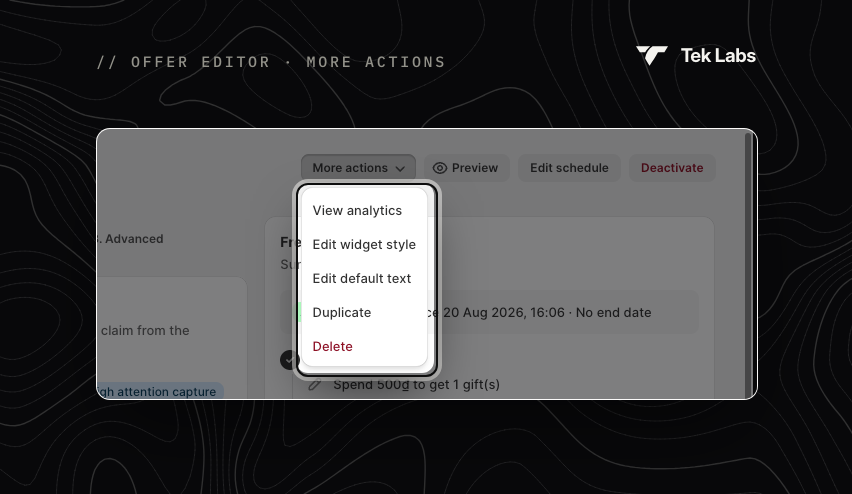
| **More actions** | Always | **View analytics**, **Edit widget style** (opens [Styling](/free-gift-userguide/user-guides/styling.md)), **Edit default text** (opens [Translations](/free-gift-userguide/user-guides/translation.md)), **Duplicate** and **Delete**. Product bundle also has **Edit bundle info**. |
More actions
{% hint style="info" %}
A new offer is **Active** from its first save, starting at the moment you created it, with no end date. Use **Edit schedule** to add an end date, or **Deactivate** to keep it off.
{% endhint %}
## Schedule an offer
The schedule window replaces the old **Active dates** section.
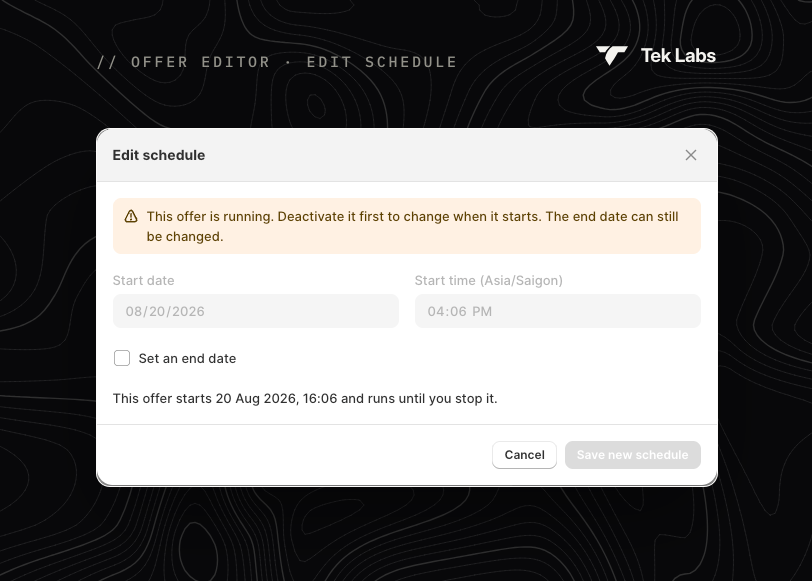
Edit schedule
1. Set the **Start date** and **Start time** (in your browser's time zone).
2. Optionally tick **Set an end date** and set the **End date** and **End time**.
3. Read the summary line, for example "This offer runs 1 Nov 2026, 09:00 to 30 Nov 2026, 23:59."
4. Click **Save new schedule** and confirm.
* If the start is now or in the past, you're asked **Start this offer right away?** with **Activate now**.
* If the end is in the past, you're asked **End this offer now?** with **End it now**.
* While an offer is running you can't change its start; deactivate it first. You can still change the end date.
* Saving a schedule also turns the offer on if it was off.
{% hint style="info" %}
The **Countdown timer** counts down to the end date, so set an end date first if you want to show a timer.
{% endhint %}
## Validate offer
**Validate offer** checks that a saved Free gift or Progress bar offer can work on your storefront. It is available for **Inactive** or **Scheduled** offers with no unsaved changes. It doesn't change the offer's status.
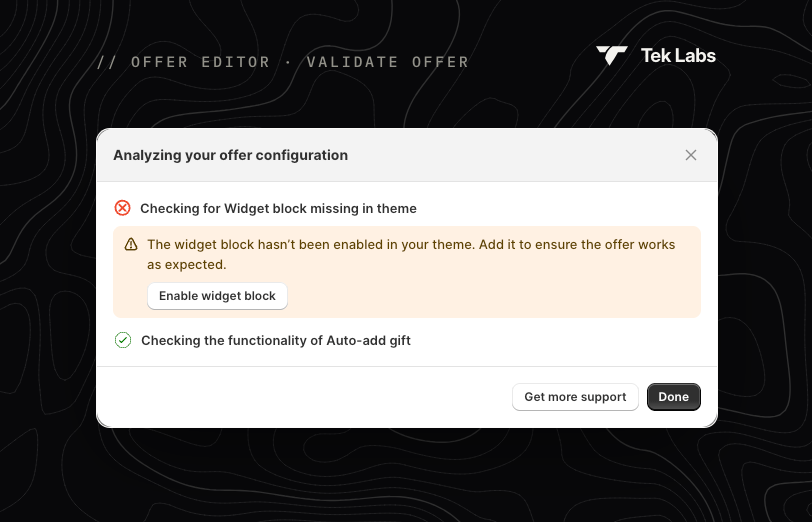
The window **Analyzing your offer configuration** runs these checks. You can close it and keep working; saving is paused until it finishes.
| Check | If it fails |
| ------------------------------------------------------ | ------------------------------------------------------------------------------------------------ |
| Checking for Widget block missing in theme | The widget's app embed is off. Click **Enable widget block**, then **Save** in the theme editor. |
| Checking the functionality of Auto-add gift | Some gifts are out of stock or in draft, so auto-add may not work for them. |
| Checking for offer visibility capability in your store | The offer includes draft products, which prevent it from appearing on your store. |
| Checking the position of Popup in your store | Information only: confirms which pages the popup is set to appear on. |
The result appears in the **Setup check** and **Last validated** columns of the Offers list. Run it again after fixing an issue.
## Duplicate or delete
* **Duplicate** copies the offer and opens the copy in a new tab.
* **Delete** removes the offer. Shoppers stop seeing it immediately, and this can't be undone.
## Banners you may see
* **"{Widget} is not in your theme"**: add the app embed. See [Enabling Tek Labs app](/free-gift-userguide/getting-started/enabling-tek-labs-app.md).
* **"It usually takes between 1 to 5 minutes for it to appear on the store."**: changes to an active offer take a few minutes to reach your storefront.
* **A product or collection was deleted in Shopify admin**: remove the deleted item from the offer and save again.
* **This offer has reached its discount usage limit**: the total usage limit you set has been reached.