> For the complete documentation index, see [llms.txt](https://document.tek-labs.app/free-gift-userguide/llms.txt). Markdown versions of documentation pages are available by appending `.md` to page URLs; this page is available as [Markdown](https://document.tek-labs.app/free-gift-userguide/getting-started/enabling-tek-labs-app.md).
# Enabling Tek Labs app
Turn on the app embeds so your offers appear on your storefront.
Each widget loads from an **app embed** in your Shopify theme. An offer only appears on your store when the embed for its widget is switched on in your **published (live)** theme.
## Check the status from the Dashboard
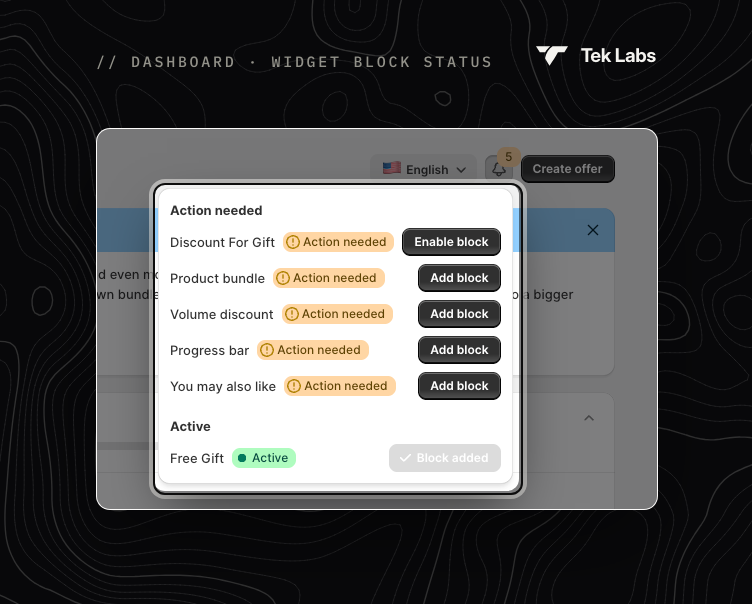
Click the **bell icon** at the top of the Dashboard to open **Widget block status**. An orange number on the icon shows how many widgets need your attention.
Widget block status
| Status | Meaning | What to do |
| ----------------- | -------------------------------------------------------------------------------- | --------------------------------------------------------------------------- |
| **Action needed** | You have an offer of this type, but its app embed is off. The widget won't show. | Click **Enable block** or **Add block**, then **Save** in the theme editor. |
| **Active** | The app embed is on. The row shows **Block added**. | Nothing. |
Widgets you have no offers for, and whose embed is off, are not listed.
{% hint style="danger" %}
Pay special attention to rows marked **Action needed**: those offers are active but shoppers can't see them yet.
{% endhint %}
## Enable a widget
**Fastest way:** click **Enable block** or **Add block** next to the widget. Shopify opens the theme editor on your live theme with the embed already switched on. Click **Save** in the top-right corner.
**Manual way:**
1. In Shopify admin, go to **Online Store › Themes › Customize**.
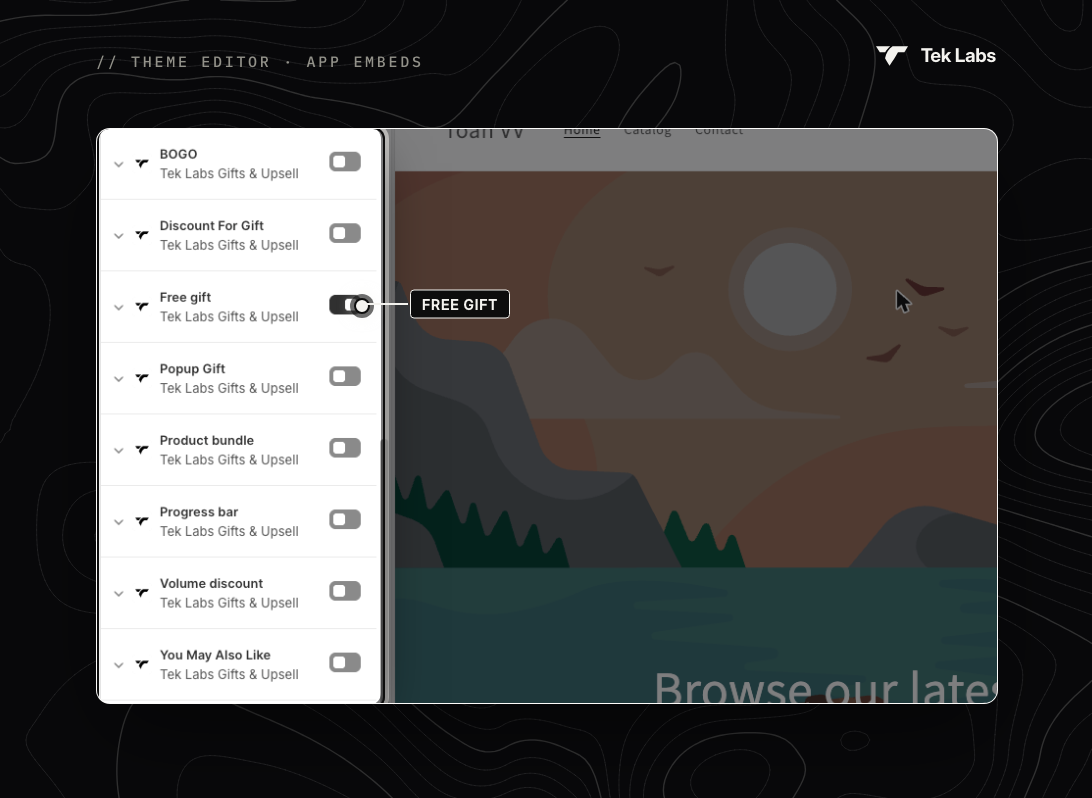
2. Click the **App embeds** icon in the left sidebar.
3. Switch on the embed for your widget (see the table below).
4. Click **Save**.
App embeds from Tek Labs Gifts & Upsell
{% hint style="warning" %}
Once the theme is saved, the **Save** button turns grey. If it is still black, the change hasn't been saved yet.
{% endhint %}
### Which embed does each offer need?
| Offer type | App embed to switch on |
| -------------------------------------------- | ---------------------- |
| Free gift (all templates, BOGO, Buy X get Y) | **Free gift** |
| Gift discount code | **Discount For Gift** |
| Progress bar | **Progress bar** |
| Product bundle | **Product bundle** |
| Volume discount | **Volume discount** |
| You may also like | **You May Also Like** |
{% hint style="info" %}
You may also see **Popup Gift** and **BOGO** embeds. These are legacy embeds that load the same script as **Free gift**. You only need **Free gift** for gift offers; switching on more than one won't show the gift twice.
{% endhint %}
## Other places that remind you
* **After you save an offer**: if its widget isn't in your theme yet, a banner such as **Free gift is not in your theme** appears with **Add widget to theme** and **Open theme editor** buttons. After adding it, click **Check status**.
* **Validate offer**: the setup check reports **Widget block missing in theme** and offers an **Enable widget block** button. See [Validate offer](/free-gift-userguide/getting-started/managing-offers.md#validate-offer).
* **Styling editor**: a **Place block in Theme editor** banner appears with **Enable block** and **Refresh**.
## Move a widget on the page
By default, product-page widgets appear below the **Add to cart** button, and cart widgets appear at the bottom of the cart drawer or cart page. To place a widget somewhere else, add its **app block** in the theme editor (**Add section › Apps** or **Add block › Apps**):
| App block | Where it can be added |
| --------------------------- | --------------------- |
| **Embed gift block** | Product page template |
| **Product bundle block** | Product page template |
| **Volume discount block** | Product page template |
| **You May Also Like Block** | Any template |
| **Discount Code Block** | Any template |
You can also open the theme editor from **Styling › (widget) › Widget placement › Change widget position**, or paste the code snippet shown there into your theme.
If you have any questions, send us a message via live chat or email ****.