> For the complete documentation index, see [llms.txt](https://document.tek-labs.app/bundle-userguide/llms.txt). Markdown versions of documentation pages are available by appending `.md` to page URLs; this page is available as [Markdown](https://document.tek-labs.app/bundle-userguide/introduction/readme.md).
# What we do
Bundle offers that lift your Average Order Value — no code required.
Four bundle types, one app
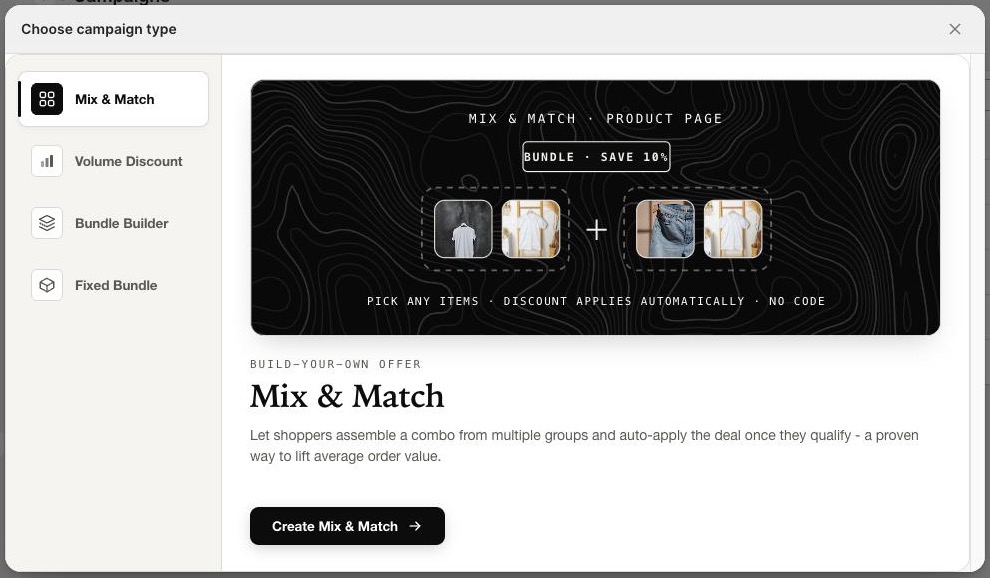
**Tek Labs Bundle** (shown in your Shopify admin as the **Mix & Match** app) helps you sell more per order with bundle offers that apply their discount automatically. Shoppers pick what they want, the price updates live, and the discount is applied at checkout — no extra apps, no code.
With **Tek Labs Bundle**, you can create four types of campaigns:
* **Mix & Match** – Let shoppers build a combo from several product groups right on the product page and unlock tiered rewards.
* **Bundle Builder** – Give shoppers a dedicated bundle page (`/pages/`) where they assemble a set step by step.
* **Volume Discount** – Reward customers for buying more of the same product with quantity-based price tiers.
* **Fixed Bundle** – Sell a fixed set of products as one bundle product with its own page and a single discounted cart line.
### What you can set up
✅ **Buy more, save more** – "Buy 2 get 10% off, buy 3 get 20% off" tiers on any product.\
✅ **Build-your-own sets** – "Pick 1 top + 1 bottom and save 15%".\
✅ **Free gifts & free shipping** – Add a free gift or a shipping discount to any reward tier.\
✅ **Required items** – Lock a product into the bundle so it is always included.\
✅ **Ready-made bundle products** – Sell a curated kit as a single product.\
✅ **Scheduled promotions** – Set a start and end date for every campaign.\
✅ **Multi-language storefronts** – Translate every label shoppers see.
Ready to start? Go to [Install & theme check](/bundle-userguide/getting-started/installation-and-theme-check.md).